Untitled Document
Home SWF Encrypt
SWF Compress Company Product Support Online Shop


System Requirements

Windows

Pentium 2 350 or Better
128mb RAM or Better
50mb Free HD Space
Windows 98SE, ME, 2K, XP, Vista

Mac OSX

500mhz or Better
128mb RAM or Better
50mb Free HD Space
Mac OS 10.4.x or Better


Trial Download

Download the SWF Compress 1.0 Trial for Windows or Mac OSX and optimize your Flash Projects Today!
Download Trial Now

Optimize & Compress your Flash SWF Movies

Available Now for Windows & Mac OSX

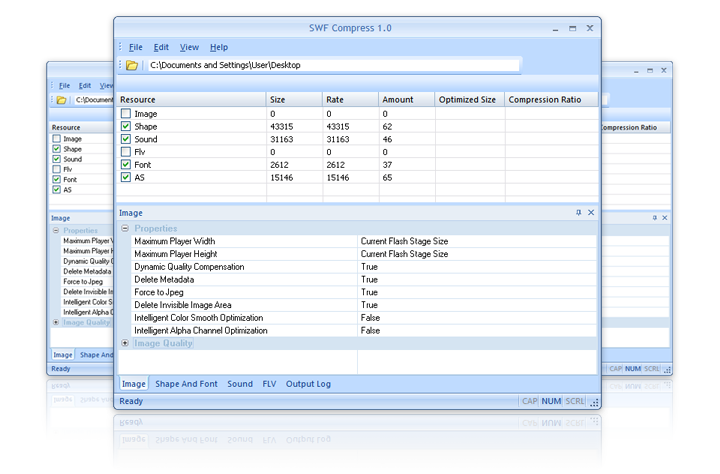
SWF Compress™ 1.0 is a powerful new Adobe Flash SWF compression tool. Optimize, Compress and Reduce your SWF files size up to 60% without loss in quality or function. SWF Compress™ 1.0 uses unique compression algorithms to optimize shapes, fonts, images, audio and more!
  • Product Overview
  • Product Features
  • Flash Movie Compression
  • Frequently Asked Questions
  • Download Trial
Untitled Document

SWF Compress 1.0 Overview

SWF Compress 1.0 uses Advanced Compression Algorithms to Optimize, Compress and Squeeze Adobe Flash SWF Files without affecting Quality or Function! SWF Compress 1.0 can target Symbols, Images, Fonts, Code and even FLVs and Audio in your SWF Files to reduce the final filesize by upto 60%!


SWF Compress 1.0 is available as an IDE for Windows and Mac OSX - Download the Trial Version Today!

*Flash® and the "f" logo are Trademarks of Adobe Systems, Inc.

Untitled Document

SWF Compress 1.0 Features

SWF Compress 1.0 uses Advanced Compression Algorithms to Optimize, Compress and Squeeze Adobe Flash SWF Files without affecting Quality or Function! SWF Compress 1.0 can target Symbols, Images, Fonts, Code and even FLVs and Audio in your SWF Files to reduce the final filesize by upto 60%!


Optimize & Compress your Flash 6, 7, 8, 9 and 10 SWF Movies

SWF Compress 1.0 has been designed specifically for Adobe Flash 6, 7, 8, 9 and 10 SWF Files. Which ever version of Flash you output to, SWF Compress can optimize and reduce the filesize upto 60%!

Download The Trial Today

Selective Compression Options

The Compression Technology used to optimize SWF Files can be set to target specific or all resources within the SWF Movie. SWF Compress 1.0 can target Symbols, Fonts, Graphics, Images, Audio and even FLVs!

Download The Trial Today

Compress & Optimize upto 60%

SWF Compress 1.0 can intelligently optimize and compress your SWF Files upto 60%. Virtually every SWF movie can be compressed and reduced in filesize with minimal or absolutely no loss in quality!

Download The Trial Today

Available for Windows & Mac OSX

SWF Compress 1.0 is available for both Windows and Mac OSX Platforms - Regardless of which Platform you work on, SWF Compress 1.0 provides the same level of Compression & Optimization on both Windows and Mac OSX!

Download The Trial Today

Untitled Document

Flash Movie Compression

The easiest way to understand the benefit of SWF Compress 1.0 is to compare a non-compressed SWF with an optimized and compressed SWF. Please take a look at the example below and select the appropriate tab to view different examples.

 
  • Example 1
  • Example 2
  • Example 3


552k
 
216k
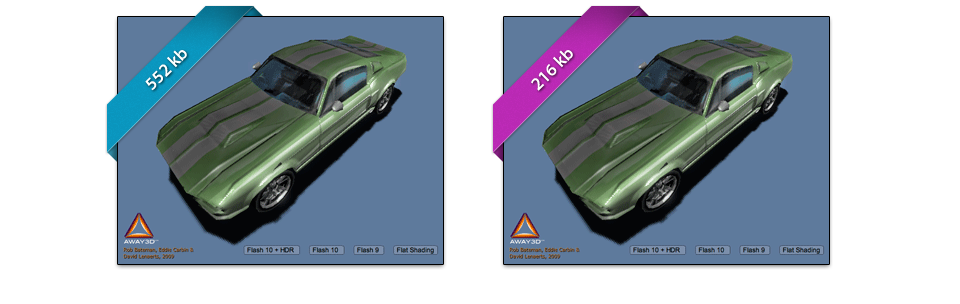
Fig. 1 (Normal SWF - Flash 10/AS3)
 
Fig. 2 (Compressed SWF - Flash 10/AS3)

This screenshot on the left (Fig. 1) shows a Flash 10 SWF Movie (courtesy of Away3D) once it has been exported from Flash. The size of the file is 552k and it has NOT been optimized by SWF Compress™ 1.0.

The Screenshot on the right (Fig. 2) demonstrates the huge reduction in filesize when the exact same SWF is compressed using SWF Compress™ 1.0 - In this example, the new file is reduced by almost 60% with absolutely no loss in quality or functionality!

Important Note

In order to fully appreciate the comparison, please download the original and optimized SWF Files by Clicking Here.


860k
 
396k
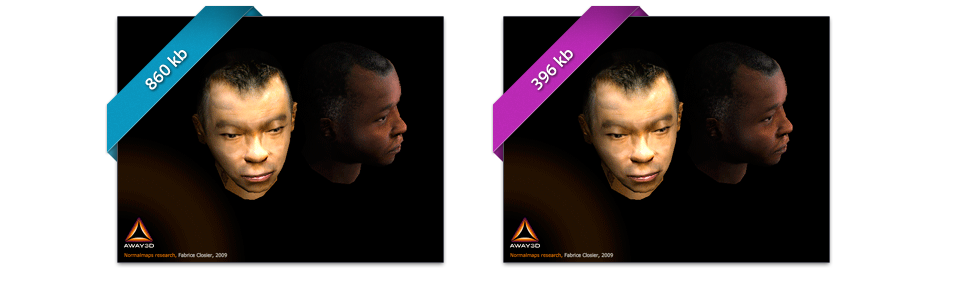
Fig. 1 (Normal SWF - Flash 10/AS3)
 
Fig. 2 (Compressed SWF - Flash 10/AS3)

This screenshot on the left (Fig. 1) shows a Flash 10 SWF Movie (courtesy of Away3D) once it has been exported from Flash. The size of the file is 860k and it has NOT been optimized by SWF Compress™ 1.0.

The Screenshot on the right (Fig. 2) demonstrates the huge reduction in filesize when the exact same SWF is compressed using SWF Compress™ 1.0 - In this example, the new file is reduced by almost 60% with absolutely no loss in quality or functionality!

Important Note

In order to fully appreciate the comparison, please download the original and optimized SWF Files by Clicking Here.


104k
 
60k
Fig. 1 (Normal SWF - Flash 6/AS2)
 
Fig. 2 (Compressed SWF - Flash 6/AS2)

This SWF Movie on the left (Fig. 1) has been exported from Flash. The size of the file is 104k and it has NOT been optimized by SWF Compress™ 1.0.

The SWF Movie on the right (Fig. 2) has been compressed using SWF Compress™ 1.0 - The new SWF file has reduced by almost 50% with absolutely no loss in quality or functionality! The compressed SWF File is only 60k.

Untitled Document

Frequently Asked Questions

Some of the most common FAQ's are listed below. Clicking on the appropriate questions will take you to the answer:


For a comprehensive list of Frequently Asked Questions and Technotes, please visit the Amayeta Support Section. FAQ's are added and updated on a daily basis.

 
Amayeta - Encryption Tools for Flash